
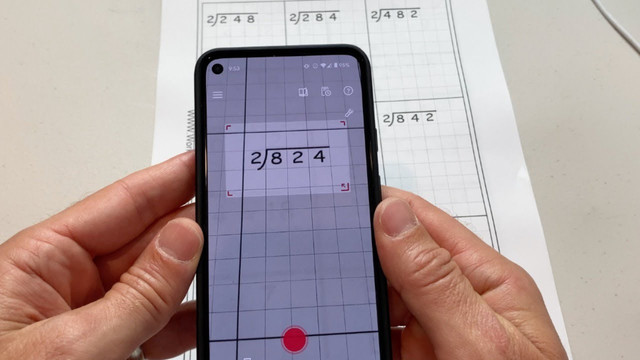
A maths solver scanner can make difficult calculations easier by allowing students to capture a mathematical problem with a camera and receive a digital solution. Instead of typing a long equation manually, users can scan printed worksheets, handwritten expressions, textbook questions, or notes and let an intelligent math-solving system analyze the problem.
These tools have become useful for more than simply finding an answer. Modern mathematics applications can recognize symbols, identify equations, perform calculations, and sometimes provide step-by-step explanations. This makes them helpful for homework checking, revision, independent practice, and understanding where a calculation went wrong.
However, using a scanner effectively requires more than pointing a camera at a page. Image quality, mathematical notation, problem complexity, and the quality of the explanation can all affect the result. Understanding how these tools work helps users get more reliable and educational results.
How a Maths Solver Scanner Works
A maths solver scanner generally combines camera-based image recognition with mathematical processing. The camera captures an equation or problem, while optical character recognition and mathematical recognition technology identify numbers, symbols, operators, fractions, variables, and other notation.
After recognition, the system converts the visual information into a mathematical expression that its solving engine can process. For example, a photographed equation such as 3x + 7 = 22 may be interpreted as an algebraic equation. The application can then calculate the value of x.
The process usually involves several stages: image capture, mathematical character recognition, expression interpretation, calculation, and presentation of the result. More advanced platforms may also generate explanations showing how the answer was obtained.
This combination makes scanning particularly useful when a question is difficult to type. A student can work directly from a worksheet or textbook rather than recreating every mathematical symbol on a keyboard.
Common Problems You Can Scan
The usefulness of a maths solver scanner depends partly on the types of questions it can recognize. Basic arithmetic is usually straightforward, while more complicated layouts may require clearer images and careful positioning.
Common examples include:
- Addition, subtraction, multiplication, and division
- Fractions, decimals, and percentages
- Linear and quadratic equations
- Algebraic expressions
- Exponents and roots
- Systems of equations
- Basic geometry calculations
- Some trigonometric expressions
- Calculus problems supported by the particular application
Word problems can be more challenging because they require understanding language as well as mathematical notation. A scanner may recognize the text but still need the user to interpret the question correctly.
Handwriting presents another challenge. Clear handwriting with adequate spacing is generally easier for recognition systems than crowded or heavily stylized writing.
Benefits for Students and Independent Learners
One major advantage of a maths solver scanner is convenience. Typing equations containing fractions, roots, superscripts, and variables can take considerable time. Scanning reduces that effort and allows learners to focus on the mathematics.
Another benefit is answer verification. Students can solve a problem independently and then scan it to compare their result with a generated solution. If the answers differ, the student can review the working rather than automatically assuming the software is correct.
These tools can also support self-paced learning. A learner who becomes stuck on an algebra problem can inspect the method used to reach the answer and then attempt a similar problem independently.
For parents and tutors, scanning tools may provide another way to review homework. They can help identify calculation errors and encourage discussion about the method used rather than concentrating only on the final number.
Scanning Accuracy Depends on Image Quality
A clear photograph can significantly improve recognition. Poor lighting, shadows, tilted pages, blurred images, or overlapping handwriting can cause mathematical symbols to be interpreted incorrectly.
For example, the scanner might confuse a multiplication sign with another symbol or misunderstand a handwritten variable. Fractions can also create problems when the numerator and denominator are not clearly separated.
For better results, place the page on a flat surface and keep the camera steady. Make sure the entire equation is visible and avoid unnecessary background material. Good contrast between the writing and the paper can also help recognition.
Before accepting an answer, users should check whether the scanned expression matches the original question. A perfectly calculated answer to an incorrectly recognized equation is still the wrong answer.
Maths Solver Scanner Compared With Manual Input
Manual input remains useful when a problem is short or when scanning produces an incorrect interpretation. It gives the user complete control over every symbol and number.
Scanning, on the other hand, is particularly convenient for printed worksheets and handwritten exercises. The choice depends on the situation, as shown below.
| Feature | Scanning Method | Manual Input |
|---|---|---|
| Equation entry | Camera-based | Typed or entered through a math keyboard |
| Speed for long expressions | Often convenient | Can take longer |
| Handwritten problems | May recognize them | Requires retyping |
| Symbol control | Depends on recognition | User controls each symbol |
| Worksheet use | Very convenient | Less convenient |
| Error checking | Requires review of recognition | Easier to verify while entering |
| Best use | Quick capture and checking | Precise mathematical entry |
Neither method is automatically suitable for every problem. Students should choose whichever makes the mathematical work clearer and easier to verify.
Using Scanning Tools for Learning Instead of Shortcuts
A maths solver scanner becomes more educational when it is used as a learning aid rather than an answer generator. Students should ideally attempt the problem first, then use the tool to check their reasoning or investigate a difficult step.
For example, if a learner solves a quadratic equation and gets a different result from the scanned solution, the important question is why the answers differ. Reviewing factorization, signs, formulas, or arithmetic can reveal the mistake.
Step-by-step explanations can also be rewritten in the student’s own words. This encourages understanding of mathematical procedures and makes it easier to apply the same method to another problem.
Simply copying a generated answer may complete an assignment, but it does not necessarily build mathematical ability. Active problem solving remains important.
Helpful Features to Look For
When comparing a maths solver scanner, users should consider more than camera functionality. Different tools can provide different levels of mathematical assistance.
Useful features may include equation recognition, step-by-step solutions, graphing, symbolic calculations, history, practice support, and the ability to handle handwritten expressions. Some systems may also explain individual operations or provide alternative solving methods.
Students should pay particular attention to whether the tool supports the topics they are studying. A system that handles arithmetic well may not provide the same level of support for calculus, matrices, geometry, or advanced algebra.
Privacy can also matter when using camera-based applications. Users should understand how scanned images are processed and whether images or account information are stored.
Practical Ways to Get Better Results
Using a maths solver scanner effectively requires a simple checking routine. First, capture the problem clearly. Second, inspect the recognized expression. Third, review the solution method. Finally, compare the result with your own work.
When scanning a textbook page containing several questions, selecting only the intended problem can reduce confusion. If the application allows cropping, remove unrelated text and diagrams before processing the equation.
For handwritten mathematics, rewrite unclear symbols when necessary. A small change in a variable or exponent can completely alter the answer.
It is also useful to test the tool with a problem whose answer you already know. This can help you understand how accurately it recognizes your particular handwriting or the type of notation used in your coursework.
Limitations to Keep in Mind
A maths solver scanner is not infallible. Recognition errors, ambiguous handwriting, unusual notation, and complicated diagrams can produce incorrect interpretations. Even when the mathematical calculation is performed correctly, the original problem may have been misunderstood.
Word problems require additional care because mathematical meaning can depend on context. Geometry questions involving diagrams may also require information that cannot be fully understood from a simple image.
For these reasons, students should treat scanned solutions as assistance rather than unquestionable authority. Teachers, textbooks, worked examples, and independent calculations remain valuable sources for learning.
Supporting Different Learning Styles
Visual learners may find scanning especially convenient because they can move directly from a physical question to a digital explanation. Students who prefer written working can compare their calculations with generated steps and identify differences.
For learners practicing independently, scanning can reduce the frustration associated with repeatedly typing complicated expressions. This can make practice sessions more focused, especially when many similar problems need to be checked.
The technology can also support revision. Students can scan selected questions from previous assignments, review the solving method, and then attempt related problems without looking at the final answer.
Responsible Use in Homework and Study
Using a maths solver scanner responsibly means keeping the learning objective at the center of the activity. If the purpose of an exercise is to practice solving equations, the student should make a genuine attempt before requesting assistance.
Teachers may also have different rules regarding digital solving tools. Students should follow classroom and examination policies rather than assuming that technology is permitted in every situation.
A useful study approach is to solve first, scan second, analyze third, and practice again. This turns the technology into a feedback mechanism instead of replacing the student’s own reasoning.
Conclusion
A maths solver scanner offers a convenient way to capture mathematical questions and receive digital assistance without manually entering every symbol. Its strongest uses include checking calculations, understanding solution steps, reviewing difficult exercises, and supporting independent study.
Accuracy still depends on clear images, correct recognition, and careful interpretation. Students should verify the scanned equation and understand the method rather than relying only on the displayed answer. Used thoughtfully, scanning technology can complement traditional mathematics practice while making digital problem solving faster and more accessible.