
Introduction
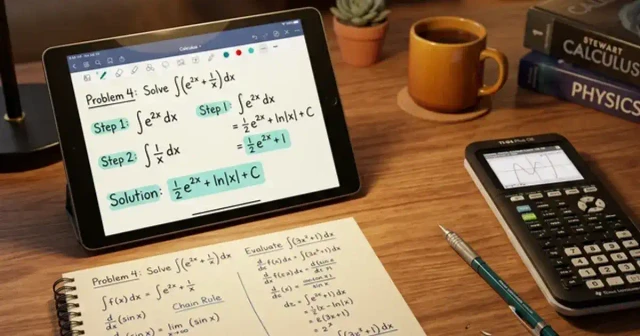
A maths solver scanner is a useful digital tool that helps students understand and solve mathematical problems by scanning printed questions, handwritten equations, or textbook exercises. Instead of entering every number and symbol manually, users can often capture a question with a smartphone camera and receive a solution with explanations. This makes solving mathematics more convenient, especially when working through homework, revision exercises, and challenging calculations.
Modern math-solving applications can recognize equations, simplify expressions, solve algebraic problems, and explain selected steps. Some tools also support geometry, fractions, percentages, and basic arithmetic. However, the features available depend on the application, the quality of the scanned image, and the complexity of the question.
For students, parents, teachers, and independent learners, a maths solver scanner can make studying more flexible. Its greatest benefit is not simply providing an answer but helping users understand the methods behind that answer. When used responsibly, it can support classroom learning, reduce repetitive work, and encourage better problem-solving habits.
What Is a Maths Solver Scanner?
A maths solver scanner is a digital application or online tool that uses image recognition and mathematical processing to interpret questions from images. Users typically point a phone camera toward a problem, upload a photograph, or scan a page containing mathematical expressions.
The software identifies numbers, operators, variables, fractions, and other symbols before attempting to solve the recognized problem. Depending on the platform, it may display the answer, provide a step-by-step explanation, or offer alternative methods.
For example, a student can scan the equation 3x + 6 = 21. A capable solver can recognize the equation, subtract six from both sides, divide by three, and determine that x = 5.
Unlike an ordinary calculator, which generally requires manually entered information, a scanning tool can reduce the effort involved in transferring questions from books or worksheets into a digital interface.
How Does a Maths Solver Scanner Work?
Most scanning tools follow a straightforward process, although their underlying technologies and capabilities vary.
Image capture: The user takes a photograph of a textbook question, handwritten equation, or printed worksheet.
Mathematical recognition: Optical character recognition and mathematical expression recognition help identify symbols, numbers, and equation structures.
Problem interpretation: The application converts the recognized content into a mathematical expression that its solving system can process.
Calculation: A mathematical engine applies relevant rules, formulas, or numerical methods to calculate a result.
Solution display: The tool presents an answer and, when supported, explains the intermediate steps.
The quality of the result depends on accurate recognition and correct interpretation. A blurry photograph, unusual handwriting, or an ambiguous symbol can cause errors. Reviewing the scanned expression before accepting the solution is therefore important.
Key Features to Look for in a Math Scanning Tool
Different applications offer different combinations of features. Understanding these options helps users select a tool that matches their learning needs.
-
Camera-based scanning: Captures equations directly from printed pages or handwritten notes.
-
Step-by-step solutions: Explains how a problem is solved rather than displaying only the final answer.
-
Algebra support: Handles supported equations, inequalities, expressions, and factorization problems.
-
Arithmetic calculations: Solves everyday questions involving addition, subtraction, multiplication, division, and percentages.
-
Fraction simplification: Helps convert and simplify fractions or work with mixed numbers.
-
Graphing capabilities: Some advanced tools display graphs and help users understand relationships between variables.
-
Multiple input methods: Allows users to type equations, upload images, or write mathematical symbols on a screen.
-
Learning assistance: May include practice questions, formula explanations, or related exercises.
Before choosing an application, check whether its features are available without payment. Some services limit scanning, advanced calculations, or detailed explanations to premium subscriptions.
Benefits of Using a Maths Solver Scanner
A scanning tool can improve the convenience of mathematics practice in several ways. Its usefulness depends on how students incorporate it into their regular study routine.
Saves time on manual entry: Scanning can be quicker than typing lengthy equations, especially when a worksheet contains multiple questions.
Supports independent learning: Students can check their work while studying at home and investigate unfamiliar solution methods without immediately needing assistance.
Makes difficult steps easier to review: Detailed explanations can help learners identify where they misunderstood a formula or made a calculation error.
Encourages regular practice: When checking answers becomes easier, students may feel more comfortable attempting additional exercises.
Helps with revision: Learners can use scanning tools to review algebraic techniques, fractions, equations, and other topics before assessments.
Assists parents and tutors: Adults helping students with homework can use these applications to check calculations and revisit unfamiliar methods.
Nevertheless, convenience should not replace independent thinking. Students learn more effectively when they attempt a problem first and use the scanner to check their reasoning.
Types of Mathematics Problems These Tools Can Solve
A maths solver scanner may support several mathematical topics, but no single application should be assumed to handle every problem correctly.
| Mathematics topic | Example problem | Potential benefit |
|---|---|---|
| Basic arithmetic | 245 ÷ 7 | Checks numerical calculations |
| Fractions | 2/3 + 1/6 | Simplifies fractional operations |
| Algebra | 3x + 6 = 21 | Finds unknown variables |
| Percentages | 15% of 200 | Calculates percentage values |
| Quadratic equations | x² − 5x + 6 = 0 | Finds supported equation solutions |
| Exponents | 2³ × 2² | Applies exponent rules |
| Graphing | y = 2x + 1 | Visualizes relationships between variables |
| Geometry | Area of a rectangle | Helps apply relevant formulas |
The table provides illustrative examples, not a guarantee that every scanner supports each topic. Geometry questions involving diagrams, proofs, or multiple conditions may require more advanced software or additional explanation.
How to Use a Maths Solver Scanner Effectively
Getting a reliable result begins with capturing the question correctly. Follow these practical steps when using a compatible application.
Step 1: Choose a suitable tool. Select an application that supports your mathematical topic and offers the explanation features you need.
Step 2: Prepare the question. Place the book or worksheet on a flat surface with adequate lighting. Keep the page visible and avoid shadows.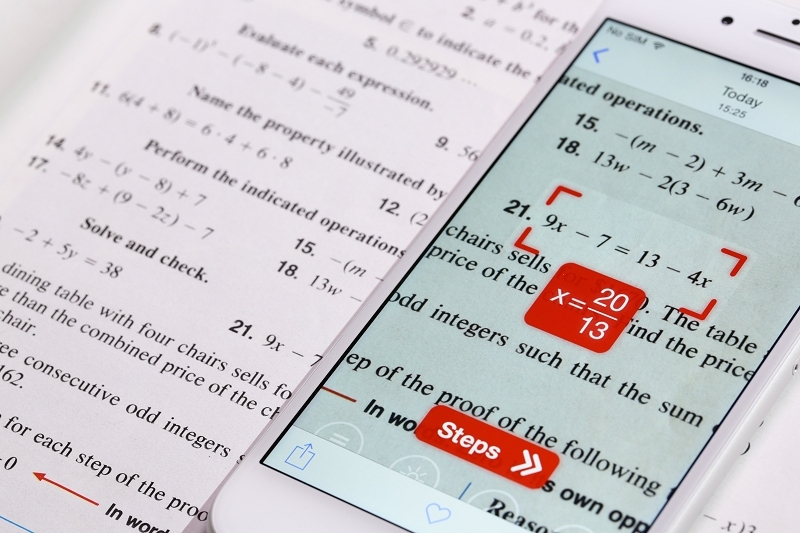
Step 3: Capture the equation. Position the camera so that the complete problem appears within the scanning area. Make sure symbols, decimal points, and exponents remain readable.
Step 4: Review recognition. Check whether the application interpreted the original question correctly. Correct any missing or misread symbols before proceeding.
Step 5: Examine the solution. Read the intermediate steps and compare them with the mathematical rules you have learned.
Step 6: Verify the answer. Substitute the result into the original equation when possible, or check the calculation using another reliable method.
Step 7: Practise independently. Close the solution and attempt a similar question without assistance. This helps turn a digital explanation into lasting knowledge.
These steps encourage accuracy while ensuring that the tool supports learning instead of becoming a substitute for practice.
Maths Solver Scanner for Students and Teachers
Students can use scanning applications for homework checks, examination revision, and understanding unfamiliar mathematical procedures. For instance, a learner struggling with linear equations can compare the tool’s explanation with classroom notes to identify the purpose of each operation.
Teachers may find these tools helpful when preparing examples, checking calculations, or demonstrating different solution approaches. However, classroom use should follow school policies, particularly during tests and assignments that require independent work.
Parents can also use a scanner when supporting children with homework. Rather than simply sharing the displayed answer, they can discuss why a particular formula applies and ask the child to explain the next step.
For younger learners, supervision may be appropriate. Adults should help children understand that mathematical progress comes from developing reasoning skills, not from obtaining instant answers.
How to Choose the Right Maths Solver Scanner
Selecting a suitable application involves more than comparing advertised features. Consider your study requirements, available budget, and preferred learning style.
First, check subject coverage. A student studying elementary arithmetic may need only basic scanning and calculations, while someone studying advanced algebra may require symbolic manipulation and graphing.
Next, evaluate explanation quality. A clear sequence of mathematical operations is generally more valuable for learning than an unexplained final result.
Also consider ease of use. A simple camera interface, readable results, and straightforward correction options can make regular practice more comfortable.
Privacy deserves attention as well. Review the application’s permissions and privacy policy before uploading photographs of school documents, personal notes, or other sensitive material.
Finally, compare free and paid features. Some applications provide basic calculations without charge, while others restrict detailed solutions or advanced topics. Choose based on actual educational needs rather than promotional promises.
Common Limitations and Mistakes to Avoid
Although a maths solver scanner can be useful, it is not completely reliable. Understanding its limitations helps prevent avoidable mistakes.
Poor image quality can cause incorrect symbol recognition. For example, the number 1 may be confused with the letter l, while a minus sign might be overlooked. Handwritten fractions and tightly spaced equations can create similar problems.
Another limitation involves mathematical context. A tool may solve an expression correctly but misunderstand what a word problem is asking. Some applications also struggle with complex diagrams, handwritten proofs, or questions requiring several connected reasoning steps.
Users should avoid copying answers without understanding them. This habit can make homework appear complete while leaving important knowledge gaps.
To reduce these risks:
-
Check every recognized equation against the original question.
-
Confirm that the chosen method matches the problem.
-
Review units and mathematical conditions.
-
Use a second calculation method when an answer seems questionable.
-
Follow academic integrity rules when completing assignments or examinations.
A scanning tool should be treated as a learning assistant, not an unquestionable authority.
Maths Solver Scanner Compared with Traditional Calculators
Traditional calculators and scanning tools serve related but different purposes. A calculator is often better for quick numerical operations, repeated calculations, and dependable everyday arithmetic. A scanner can be more convenient when the question is printed or handwritten and entering it manually would take extra time.
A scientific calculator may also provide trigonometric functions, logarithms, and other specialized operations without requiring a photograph. Meanwhile, a suitable scanning application may offer visual recognition and explanations that a basic calculator does not provide.
The best choice depends on the task. Students can use a calculator for routine computation, a scanner for interpreting written problems, and textbooks or teachers for deeper conceptual understanding.
Combining these resources thoughtfully can make mathematics practice more efficient without sacrificing accuracy or independent reasoning.
Conclusion
A maths solver scanner offers a convenient way to interpret mathematical questions, check calculations, and explore step-by-step solutions. By reducing manual entry and providing access to explanations, these tools can support students, teachers, parents, and independent learners across many mathematical topics.
Choosing the right application requires attention to subject coverage, recognition accuracy, privacy, pricing, and explanation quality. Users should also remember that scanning technology has limitations and may occasionally misinterpret a question or produce an incorrect result.
The most effective approach is to combine digital assistance with active learning. Attempt each problem independently, use the scanner to investigate difficult steps, verify the answer, and practise similar questions afterward. With this balanced approach, a maths solver scanner can become a valuable study companion that improves convenience while strengthening mathematical understanding.